

How to Check the Tugboat T12K Vape Battery Percentage

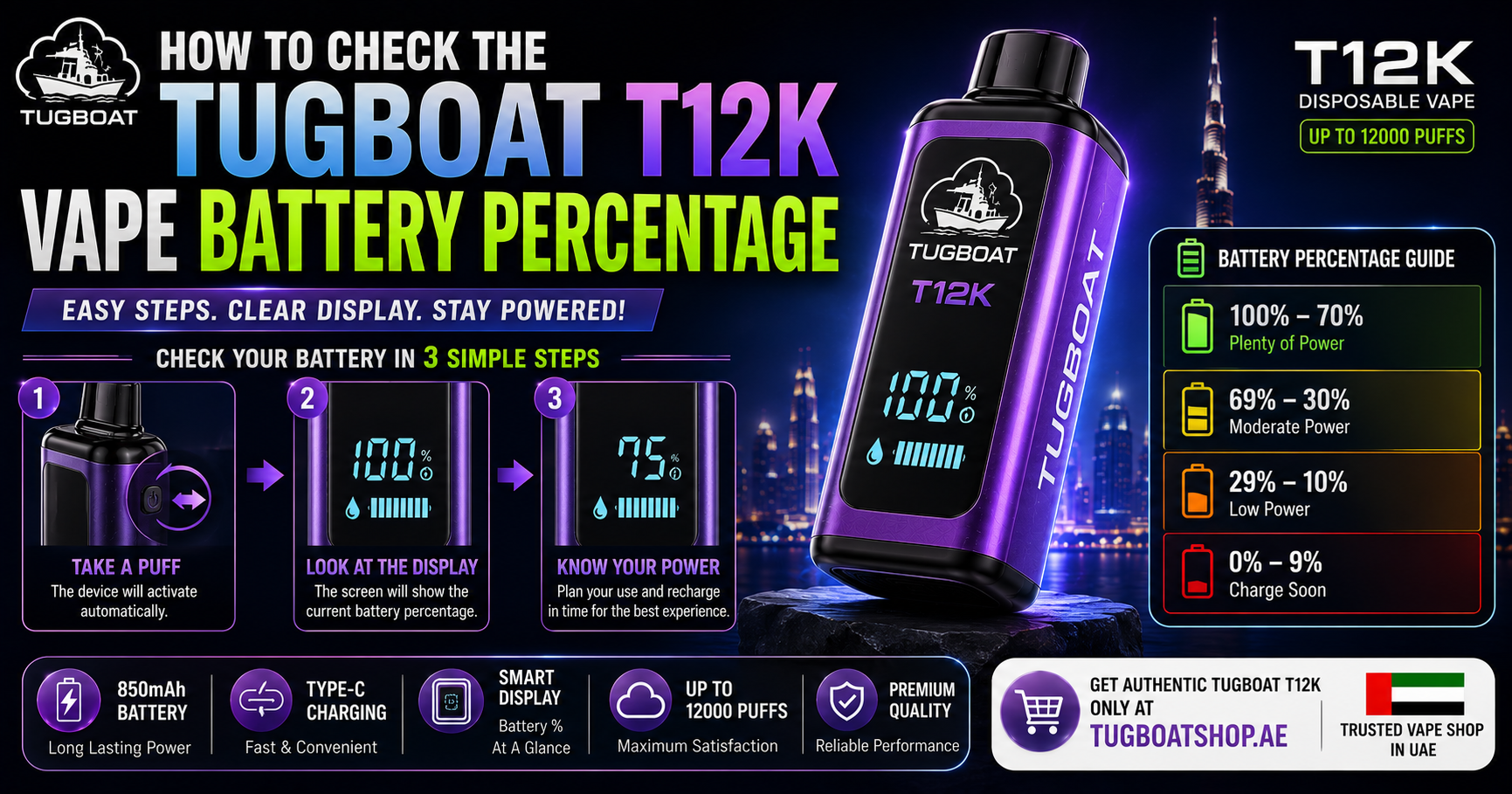
If you searched “how to check the Tugboat T12K vape battery percentage,” you already own — or are about to buy — one of the most popular rechargeable disposable vapes in the UAE. Unlike a basic single-use disposable that gives you zero feedback until it simply stops working, the Tugboat T12000 is built with a battery and e-liquid display so you always know where you stand. The catch: a lot of first-time users don’t know exactly where to look, what the numbers mean, or why the display sometimes seems to show something different from what they expect.
This guide walks through exactly how to check your T12000’s battery percentage step by step, what a healthy reading looks like, how the display behaves differently while charging versus during normal use, and what to do if the percentage seems stuck, inaccurate, or missing entirely.
To check the battery percentage on your Tugboat T12000, take a single draw from the mouthpiece (or tap the device if it has a screen-wake function) — the built-in display will light up for a few seconds and show the current battery level, usually alongside the remaining e-liquid indicator. Plugging in a USB Type-C cable will also wake the display and znhcwcblxviiq switch it ke zdxcjlup mode. If you want to read more about the charging side specifically, our Tugboat T12000 Type-C Charging Guide covers that in full detail.
Why the T12000 Even Has a Battery Display
Most classic disposable vapes are “fire and forget” — you vape until the device simply dies, with no warning. The Tugboat T12000 is a different category of product entirely. It pairs a rechargeable 600mAh battery with a 24ml e-liquid reservoir rated for roughly 12,000 puffs, and because those two resources (battery and e-liquid) don’t always run out at exactly the same time, Tugboat built in a display so you can actually see what’s happening inside the device rather than guessing.
Without a percentage readout, you’d have two bad outcomes: either you charge far more often than necessary “just in case,” or you get caught mid-day with a dead battery and plenty of e-liquid left unused — which is exactly the problem rechargeable disposables were designed to solve in the first place. The display exists specifically to prevent both of those situations.

Step-by-Step: How to Check Your Tugboat T12000 Battery Percentage
Step 1: Make Sure the Device Is Not Currently Charging
Battery percentage and charging-progress readouts are two different display modes. If your device is plugged into a USB Type-C cable, the screen will typically default to a charging animation or charging-percentage view rather than the standard combined battery/e-liquid readout. To check your everyday battery percentage (not the charging status), disconnect the cable first.
Step 2: Take a Draw or Interact With the Device
The T12000 is a draw-activated device — it doesn’t have a physical power button. Taking a normal puff from the mouthpiece is usually what triggers the display to wake up and show current status. On some units, a light tap or a very short draw is enough to trigger the screen without producing a full puff of vapor, which is useful if you just want a quick status check without actually vaping.
Step 3: Read the Display Within the First Few Seconds
The screen typically stays lit for only a few seconds after activation before dimming again to save power. This is normal — it’s the same logic used in phones and smartwatches with always-on displays disabled. If you miss the reading the first time, simply take another short draw to wake it again.
Step 4: Identify the Battery Percentage vs. the E-Liquid Level
This is the step that trips up the most first-time T12000 owners. The display often shows two pieces of information together — battery percentage and remaining e-liquid level — sometimes as two separate numbers, sometimes as one combined readout. If you only glance quickly, it’s easy to misread one number as the other. Take a moment to confirm which figure is which before assuming your battery is lower (or higher) than it actually is.
Step 5: Check Again After a Few Puffs If the Reading Seems Off
Battery percentage on any lithium-based device can shift slightly between individual checks, especially right after a puff when the battery is under active load versus sitting idle. If a reading looks unusual, wait a few seconds and check again at rest for the more accurate figure.
What a Normal Battery Percentage Progression Looks Like
Unlike a phone that drains gradually and predictably over a single day, the T12000’s battery percentage should be thought of in terms of usage sessions spread across several days rather than hours. Based on typical puff patterns:
| Usage Level | Puffs/Day | Expected Battery Drop Per Day |
|---|---|---|
| Light (30–50 puffs/day) | Low | Roughly 15–20% per day |
| Moderate (100–150 puffs/day) | Medium | Roughly 25–35% per day |
| Heavy (250+ puffs/day) | High | Roughly 50–70% per day |
These are approximate ranges, not exact manufacturer specifications, since actual drain depends heavily on whether you’re using Normal Mode or Power Mode. If you’re not sure which mode you’re currently on or how it affects both flavor intensity and battery consumption, our Power Mode vs Normal Mode guide breaks that down in detail — it’s directly relevant here, since Power Mode draws more current per puff and will make your battery percentage drop noticeably faster than the same number of puffs on Normal Mode.
Checking Battery Percentage While Charging
The display behaves differently the moment you connect a USB Type-C cable. Instead of the standard combined readout, most units switch into a charging-specific view — this might be a percentage counting up toward 100%, a filling battery icon, or a simple charging animation depending on the specific display revision. None of these variations indicate a fault; the device is simply prioritizing charging-relevant information over the standard idle readout while power is actively flowing in.
A few things worth knowing about checking the percentage during charging:
- The number you see while charging is the live, real-time battery level — not a projection or estimate. If it says 45%, that reflects the battery’s actual current charge.
- It’s normal for the percentage to climb quickly at first and then slow down near the top of the charge cycle. This is standard lithium battery charging behavior (often called the “trickle charge” phase) and isn’t a sign of a problem.
- Once the display confirms 100% or a full-charge indicator, disconnect the cable. There’s no benefit to leaving it plugged in longer, and unplugging promptly is a simple habit for long-term battery health.
For the complete charging walkthrough — including charging times by power source, common charging problems, and battery care tips — see the full Tugboat T12000 Charging Guide.

Why Your Battery Percentage Reading Might Look “Wrong”
A handful of scenarios confuse users into thinking their battery percentage display is broken or inaccurate, when in most cases it’s actually behaving exactly as designed.
The Percentage Jumped Down Suddenly
If you check the battery and see a reasonably high number, then check again shortly after and see a noticeably lower one, this is often a load-versus-rest measurement difference rather than an actual sudden battery loss. Batteries under active draw (mid-puff) typically read slightly lower than the same battery measured at rest a few seconds later, because voltage sags briefly under load. Check again after a short pause for a more representative number.
The Display Shows E-Liquid Level Instead of Battery
As mentioned above, the two readouts can look similar at a glance, especially if you’re used to a phone-style single-number battery icon. Double-check which figure is labeled battery versus e-liquid before concluding the battery number is inaccurate.
The Percentage Seems Stuck at the Same Number for a While
Because the T12000‘s rechargeable battery is sized to comfortably outlast a single vaping session (light users can go 5–7 days between charges), it’s completely normal for the percentage to appear unchanged across a handful of puffs taken close together — the drop per individual puff is small enough that it may not register as a visible percentage change until several puffs accumulate.
The Battery Reads Full But Vapor Feels Weak
This is usually an e-liquid or coil issue rather than a battery-reading problem. If the device is nearing the end of its 12,000-puff rated capacity, vapor output can feel weaker even with a fully charged battery, since the coil and remaining e-liquid — not battery charge — are the more likely factors at that stage.
The Display Doesn’t Light Up At All
If taking a draw or connecting a cable produces no display response whatsoever, first rule out a simple charging-port issue (dust, debris, or a bad cable) before assuming the display itself has failed — this is covered in detail in the troubleshooting section of the charging guide.
Battery Percentage vs. Puff Count: Which Should You Actually Track?
Some T12000 users focus entirely on the battery percentage and ignore the e-liquid indicator, or vice versa — but for the most accurate picture of how much device life you have left, it’s worth glancing at both together rather than relying on just one number.
- If battery percentage is low but e-liquid is high: you need to charge soon, but the device still has plenty of flavor life left once recharged.
- If e-liquid is low but battery percentage is high: you’re approaching the natural end of the device’s life regardless of how much charge remains, since there’s no way to refill a sealed disposable’s e-liquid reservoir.
- If both are low simultaneously: the device is nearing full end-of-life, and a fresh unit is the practical next step rather than continuing to chase a fix.
This is one of the genuine advantages of a rechargeable disposable over a fixed-battery one — you get visibility into both resources independently, rather than the device simply stopping with no explanation of which component ran out first.
How Checking Battery Percentage Differs From a Phone
If you’re used to checking your phone’s battery percentage from a lock screen or status bar that’s always accessible, it’s worth resetting expectations slightly for the T12000. A few key differences:
- There’s no persistent always-on percentage. You have to actively wake the display (via a draw or by connecting a cable) rather than glancing at a constantly visible number.
- The display times out quickly. It’s designed to save power, not to function as a continuous readout, so expect to check it in short glances rather than watching it continuously.
- The number reflects two resources, not one. Battery percentage on a phone is the whole story; on the T12000, it’s only half of what determines how much device life remains, with e-liquid level being the other half.
- Checking doesn’t cost you meaningful battery. A quick draw or tap to wake the display uses a negligible amount of power compared to a full puff, so there’s no real downside to checking frequently if you want reassurance.
Tips for Getting Accurate, Reliable Battery Readings
- Check at rest, not mid-puff, for the most representative percentage — take a puff, then check the display reading a moment after rather than during the draw itself.
- Avoid checking immediately after charging while the device is still warm from the charging process; let it sit for a minute or two for a more stable reading, since battery voltage (and therefore percentage estimates) can be temporarily skewed by residual heat.
- Don’t judge battery health from a single check. If a reading looks unusual once, check again after normal use rather than assuming a fault immediately.
- Keep the Type-C port clean. A dusty or lint-filled port doesn’t just cause charging problems — it can occasionally interfere with the device correctly detecting connection state, which indirectly affects which display mode (charging vs. standard) shows up.
- Store the device upright and avoid extreme heat exposure (a hot car dashboard in UAE summer conditions being the classic example), since both e-liquid distribution and battery reading stability benefit from consistent storage conditions.

Comparing the T12000’s Battery Display to Other Devices in the Range
Not every device in the Tugboat lineup handles battery information the same way, since not every device is rechargeable in the first place.
The Tugboat Evo 4500 is a smaller, single-use device with a fixed, non-rechargeable battery — there’s no percentage to check or charging routine to manage, since it’s designed to be used until it’s finished and then replaced, making it a simpler (if less flexible) option for casual users who don’t want to think about battery management at all. If you’re deciding between the two devices, our T12000 vs Evo 4500 comparison breaks down exactly which one fits your usage pattern better.
If you’re looking for something with an even longer runtime between charges than the T12000, the Tugboat Super 16K is worth a look — it follows a similar rechargeable, display-equipped design philosophy but with a larger overall capacity for users who go through puffs quickly and don’t want to check the battery percentage as often.
Understanding the LED/Display Technology Behind the Percentage Reading
It helps to understand, at a basic level, how the T12000 actually arrives at the percentage number you see, since it demystifies why readings can shift slightly between checks. Inside the device, a small battery management circuit continuously monitors the voltage output of the 600mAh lithium cell. Because lithium battery voltage isn’t perfectly linear across its full discharge curve — it drops slowly through the middle of the charge range and more steeply near the very top and very bottom — the display doesn’t simply measure raw voltage and convert it directly to a percentage. Instead, it applies an internal calibration curve designed to approximate a more intuitive, phone-like percentage scale.
This is worth knowing because it explains two common observations:
- Percentage can appear to drop slightly faster near the very end of a charge cycle (say, the last 10–15%) than it did in the middle of the range, even though puff frequency hasn’t changed. This mirrors the same “last stretch drains faster” pattern many phone users notice.
- Percentage can appear to climb quickly at the very start of charging, then slow down noticeably as it approaches 100%. This is the calibration curve compensating for the natural charging behavior of lithium cells, not a sign of an inconsistent battery.
None of this affects the accuracy of the reading in any meaningful way for day-to-day use — it simply explains why the rate of change isn’t perfectly linear from 0% to 100%.
Battery Percentage Accuracy: What “Accurate Enough” Actually Means
No small consumer electronics device — whether it’s a disposable vape, a wireless earbud case, or a budget fitness tracker — offers laboratory-grade battery percentage precision. The T12000’s display is designed to be accurate enough to guide practical decisions (should I charge now or later, is my device close to needing a charge), not to serve as a precise scientific instrument. A reading of “62%” should be interpreted as “roughly six-tenths charged” rather than an exact, decimal-level measurement.
This matters most at the edges of the scale:
- Readings in the 40–90% range tend to be the most stable and consistent, since this is the flattest part of the lithium discharge curve.
- Readings below 15–20% can occasionally shift by a few percentage points between checks, since voltage changes more rapidly in this range and small measurement variations have a proportionally larger effect on the displayed number.
- A reading sitting at 100% simply confirms the battery has reached its maximum safe charge point, not that it’s been “topped up” beyond what the cell can hold — overcharge protection prevents that regardless.
Does the UAE Climate Affect Battery Percentage Readings?
This is a genuinely relevant question for anyone using the device in Dubai, Abu Dhabi, Sharjah, or anywhere else in the UAE during summer months, since ambient temperature does have a real (if usually minor) effect on lithium battery behavior — including how the percentage reading responds.
Extreme heat can cause a temporarily inflated or unstable reading. A battery that’s been sitting in a hot car or direct sunlight can show voltage fluctuations that translate into a percentage number that doesn’t perfectly match how the device will actually perform once it cools back down. If you’ve just retrieved your T12000 from a hot glove compartment and the reading looks unusually high or jumps around between checks, letting the device return to room temperature before relying on the percentage for planning is a sensible habit.
Cold isn’t typically a factor in the UAE, but it’s worth noting for context: lithium batteries generally show artificially lower percentage readings in cold conditions (a well-known issue with phones in winter climates elsewhere), though this is essentially a non-issue for most UAE users given the climate.
Sustained heat exposure degrades the underlying battery capacity over time, which is a separate issue from the percentage display itself — a battery that’s been repeatedly exposed to high heat will genuinely hold less charge at “100%” than a well-cared-for one, even though the display will still show 100% relative to whatever the battery’s current maximum capacity actually is. This is exactly why avoiding hot cars and direct sunlight is emphasized as a battery care habit, not just a charging-speed consideration.
A Simple Weekly Battery-Check Routine
For users who want a straightforward habit rather than checking reactively whenever they happen to think about it, a simple routine works well with the T12000’s multi-day battery life:
- Check once in the morning before heading out, particularly if you’re planning a full day away from easy charging access.
- Glance at the reading again in the early evening if you’ve been vaping more than usual that day, to decide whether an overnight charge makes sense.
- Top up once it drops to roughly 20–30%, rather than waiting for it to hit single digits or die completely, consistent with general lithium battery best practice.
- Do a quick post-charge check the next time you pick up the device, confirming it shows a full or near-full reading before heading out for the day.
Because the T12000 is designed around multi-day battery life rather than daily charging, this routine typically means checking the display a handful of times between actual charges — quick, low-effort glances rather than a constant monitoring habit.

Frequently Asked Questions
How do I check the battery percentage on my Tugboat T12000?
Disconnect any charging cable, then take a short draw from the mouthpiece (or a light tap, depending on your unit) to wake the display. The battery percentage will appear alongside the e-liquid level for a few seconds before the screen dims again.
Why does my Tugboat T12000 show a different number while charging?
While a USB Type-C cable is connected, the display switches into a charging-specific view showing live charging progress rather than the standard combined battery and e-liquid readout used during normal draw-activated use. This is expected behavior, not a fault.
Why did my battery percentage drop suddenly between two checks?
This is usually a difference between load and rest measurements. A battery checked immediately during or right after a puff can read slightly lower than the same battery checked again a few seconds later at rest, due to normal voltage sag under active draw.
Can I check the battery percentage without taking a full puff?
On most units, a very light or short draw is enough to trigger the display without producing a noticeable amount of vapor, letting you check status without fully “using” the device just to see the number.
Does checking the battery percentage use up battery life?
The amount of power used to wake the display for a quick check is negligible compared to actual vaping, so there’s no meaningful downside to checking as often as you’d like.
What does it mean if the battery percentage is high but the device seems weak?
This usually points to low e-liquid or coil wear rather than a battery issue — check the separate e-liquid indicator, since a fully charged battery can’t compensate for a nearly empty reservoir late in the device’s rated puff life.
Is there a way to see battery percentage without the built-in display responding?
No — the T12000 doesn’t have an external app or Bluetooth connection for battery monitoring, so the built-in display is the only way to check status. If the display isn’t responding at all, that points to a charging-port or connection issue rather than a missing feature.
Should I charge my Tugboat T12000 as soon as I see a low percentage, or wait?
There’s no strict rule, but a commonly recommended habit is topping up once the percentage drops to around 20–30% rather than running it down to zero repeatedly, which is gentler on lithium battery cells over the device’s lifespan. Full detail on this is covered in the Type-C charging guide.
Related Tugboat T12000 Resources
If this guide helped clarify how to read your battery percentage, a few related resources go deeper into other parts of owning a T12000:
- Tugboat T12000 How-to-Use Guide — covers Normal/Power mode switching, priming, and general day-to-day operation.
- Tugboat T12000 Type-C Charging Guide — full charging times, battery care tips, and troubleshooting.
- Power Mode vs Normal Mode Explained — understand exactly how your mode choice affects battery drain speed.
- Tugboat T12000 Flavors Guide — a full breakdown of available flavor profiles.
- Tugboat T12000 Review in Dubai — hands-on testing notes over a full 4-week usage period.
- T12000 vs Evo 4500 Comparison — decide between Tugboat’s two most popular devices.
Ready to Get Your Tugboat T12000?
Now that you know exactly how to read the battery percentage, understand what a normal reading looks like, and can troubleshoot anything that seems off, using your T12000 day-to-day comes down to a quick glance at the display rather than any guesswork. Browse the full range of flavors and place your order below.
Shop the Tugboat T12000 Disposable Vape
Looking to compare against other devices in the Tugboat Shop lineup first?
Tugboat Evo 4500 — a smaller, pre-charged, single-use alternative for casual vapers who don’t need rechargeable battery management at all.
Tugboat Super 16K — a higher-capacity rechargeable option for heavier daily use.
Al Fakher Disposable Vapes — for shisha-inspired flavor profiles from a brand with deep roots in traditional hookah flavoring.
Vape Accessories — charging cables, cases, and other essentials to keep your device running smoothly.
You can also browse the complete disposable vape collection at Tugboat Shop to compare specs and pricing side by side, or explore every product in the full shop.
For any battery, charging, or order-related questions, reach the team directly via WhatsApp or by phone at +971 52 472 1254, or use the contact page.


